Guide
How to play
Mawtini has one core action: you are told a village's name, and you tap where it belongs on the hand-drawn map of its region. Everything else — the atlas, the Memory Map, the badges — grows out of that.
Your first round, step by step
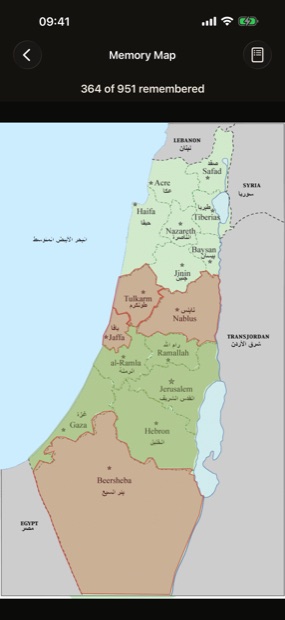
- Open Play and pick a district The map of Palestine opens with its sixteen districts — Safad, Acre, Haifa, Tiberias, Nazareth, Baysan, Jinin, Tulkarm, Nablus, Jaffa, Ramallah, al-Ramla, Jerusalem, Gaza, Hebron and Beersheba. Tap the one you want.
- Choose a region within it Each district is divided into regions, and each region has its own hand-drawn map. Pick any of them — nothing is locked behind anything else.
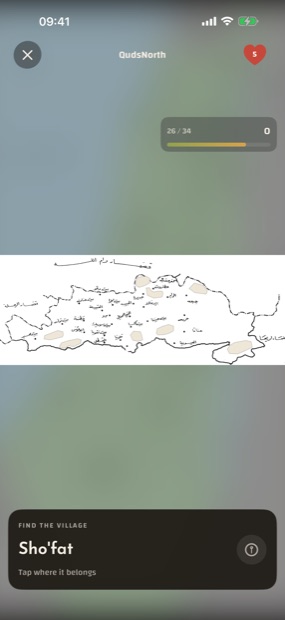
- Read the prompt A card at the bottom says Find the village and gives you a name. The map above is the district as it was traced by hand, with the village names hidden until you have found them.
- Tap where it belongs Tap the spot on the map. You do not need to be pixel-perfect — the map is divided into territories, and a tap anywhere inside the right village's territory counts.
- Keep going until the region is complete The counter at the top right shows how many of the region's villages you have placed. Complete them all and the region is solved.
Reading the board
- The heart, top corner — your remaining lives for this attempt. You start with five.
- The bar, top of the map — villages placed out of the region's total, and your score so far.
- The prompt card, bottom — the village you are looking for right now.
- The ⓘ button on the card — a hint. It narrows things down, and costs you a fifth of that village's points.
- The ✕ button, top corner — leave. Your progress in the region is kept.
Lives, points and acing a region
A wrong tap costs one life. Run out of all five and the attempt ends — you can refill and pick the region straight back up; nothing you had already placed is taken away.
Points come from how close your tap was. A tap right on the village earns the most, and the score falls away smoothly with distance rather than dropping to zero at some line. Finishing a region with lives still in hand adds a bonus of 500 points for each one, so a careful run is worth noticeably more than a lucky one. Using a hint keeps the village but reduces what it pays.
Clear a region without a single miss and it is aced. Ace ten different regions and the Perfectionist badge is yours. You can replay any region you have already solved to improve a score — replaying never takes anything away.
Challenge mode adds a countdown to each round: guess before it runs out or the round is lost. It is off by default and lives in Settings — turn it on when the maps start feeling familiar.
Today's village
Every day the app picks one village — the same one for every player, decided by the date rather than by chance. It takes a minute. Play it each day and a streak counter builds on the home screen; miss a day and the streak starts over, which costs you nothing else.
There is a Home Screen widget for it too. Touch and hold your Home Screen, tap the + in the corner, search for Mawtini, and add the widget. It shows the day's village and whether you have played it yet.
The Explore atlas
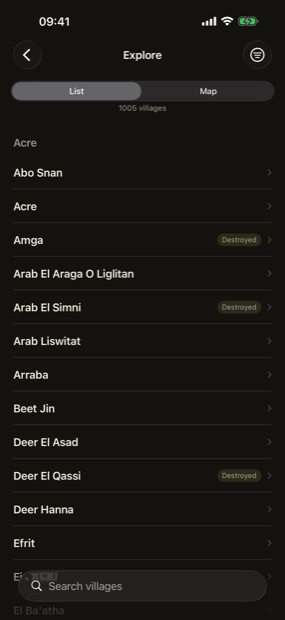
Explore is the open half of the app — no rounds, no scoring, nothing hidden. Browse all 1,025 villages and towns grouped by district, or switch to the map view and read the regional maps with their names showing.
Search finds a village however you spell it: alternate spellings are stored alongside each name, in both alphabets. Tap any result to open its page — where it stood, ringed on its own map, and what is recorded about it.
Places marked Destroyed were depopulated and destroyed. The label is stated plainly and never scored, celebrated, or turned into a reward.
The Memory Map
Every village you have located lights up on your Memory Map — one map of the whole country, filling in as you go, with a count of how many of the 951 locatable places you have remembered.
It is the only progress screen that matters. There is no leaderboard, and nothing is shared anywhere unless you deliberately tap share.
Badges
Thirteen badges mark the road: your first village, ten, fifty, a full district, a flawless run, a fast hand, a three-day and a seven-day streak, ten aced regions, and — at the end of it — all 951.
Some badges are marked reverent. Those are the ones tied to destroyed villages and sacred places; they unlock quietly, with no fireworks and no sound of celebration. That is deliberate.
The Badges button sits in the top corner of the home screen.
Settings worth knowing
| Setting | What it does |
|---|---|
| Language | Opens iOS Settings, where you choose English or العربية for Mawtini alone. The app reopens in that language, right-to-left included. |
| Numerals | Auto, 0123, or ٠١٢٣. Auto follows the app's language. |
| Sound | Turns the anthem and effects on or off. |
| Challenge mode | Adds a countdown to every round. Off by default. |
| More apps | Other apps by the same developer. This is the only screen in the app that touches the network. |
| Acknowledgements | Sources, the anthem's authors, and font licences. |
Mawtini also honours the system accessibility settings: Reduce Motion replaces every animation with a calm variant, Reduce Transparency swaps blurred backdrops for solid ones, and Dynamic Type scales the text.
Still stuck?
The FAQ covers the questions that come up most. Anything else, write to me directly.